
We are very proud to offer our valued CompuHost users exclusive access to our MyKJMedia subscription services (Karaoke Cloud PRO and Sound Choice PRO), providing seamlessly integrated, commercially legal playback access to thousands of the industry's highest quality Karaoke song selections.
Enrolling:
To enroll, simply visit mykjmedia.com , create your FREE profile and login. Once logged in, simply select the service(s) that best suits your needs and budget and click the "Buy New Subscription" button.
IMPORTANT! During enrollment you'll be needing your CompuHost License ID and Confirmation Code available by selecting "MyKJMedia->Configure/Manage MyKJMedia..." from CompuHost's Top Main Menu.
Here you'll find your License ID and Confirmation Code (see image below).

Activating:
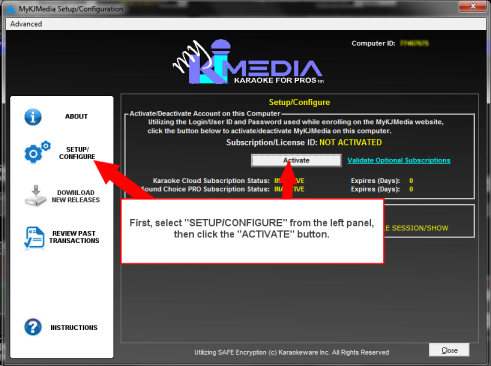
Once enrolled, you'll need to activate your new subscription(s) within CompuHost.
To do so...
- Ensure your computer has access to the Internet.
- Launch CompuHost and select "MyKJMedia->Configure/Manage MyKJMedia..." from the Top Main Menu.
- Select "SETUP/CONFIGURE" from the left panel and click the "Activate" button. (see image below)
- Enter your MyKJMedia Username and Password (same as used to login to your online profile) and click "Login".
- That's it! If successful, your subscription(s) will be activated as indicated onscreen (see example image below)

Accessing your newly available song selections:
After activating your new subscription(s), you'll need to gain access to your newly available song selections!
Here you have TWO choices depending on your access to a reliable, high speed Internet connection at your show(s) or venue(s)...
Option 1: If you expect to have reliable, high speed Internet access at your show(s) or venue(s):
You may simply opt to activate the advanced "Download On Demand" option, whereby all available MyKJMedia song selections are automatically combined with your existing song selections within CompuHost, fully seachable just like all other searches, and automatically downloaded as you need them. Simply add the selection to a Performer's Song Queue and CompuHost will kick into action, downloading the selection for playback within seconds.
To take advantage of this exciting and innovative option, simply activate it by placing a CHECK in the appropriate box! (see image below)

Option 2: If you DO NOT expect to have reliable, high speed Internet access at your show(s) or venue(s):
You may simply opt to pre-download all available song selections for offline use.
To do so...
- Ensure your computer has a reliable high speed Internet connection.
- Select "Download New Releases" from the left panel. (see image below)
- After a few seconds, all available, but not yet downloaded song selections will be listed. (see image below)
- Simply select the desired selections (or click the "Tag All" button to select ALL) and click the "Download Tagged Files" button.
- CompuHost will kick into action, automatically downloading your chosen selections for offline use. NOTE: Depending on the speed of your Internet connection, this process may take quite awhile.
- After the process completes, your new selections will be combined and cataloged with your existing song selections, searchable and assignable just as you are used to!

That's It! We hope you enjoy your new MyKJMedia subscription service.
For additional information please reference CompuHost's built-in Help System (Top Main Menu->Help->CompuHost Help) under the topic "MyKJMedia Content Delivery System".