
Be reminded of the adage "it's not if your computer will fail, but when". Yep, computers fail, often at the most inopportune times. For this reason, it's highly recommended that you backup your CompuHost datafiles on a regular basis, thus preserving your Past Performer History and Songbase (at least up to the time of the backup) for cases of a complete and unrecoverable computer failure.
And it's EASY!
Instructions:
- Open the Windows File Explorer.
- Open the C: Drive
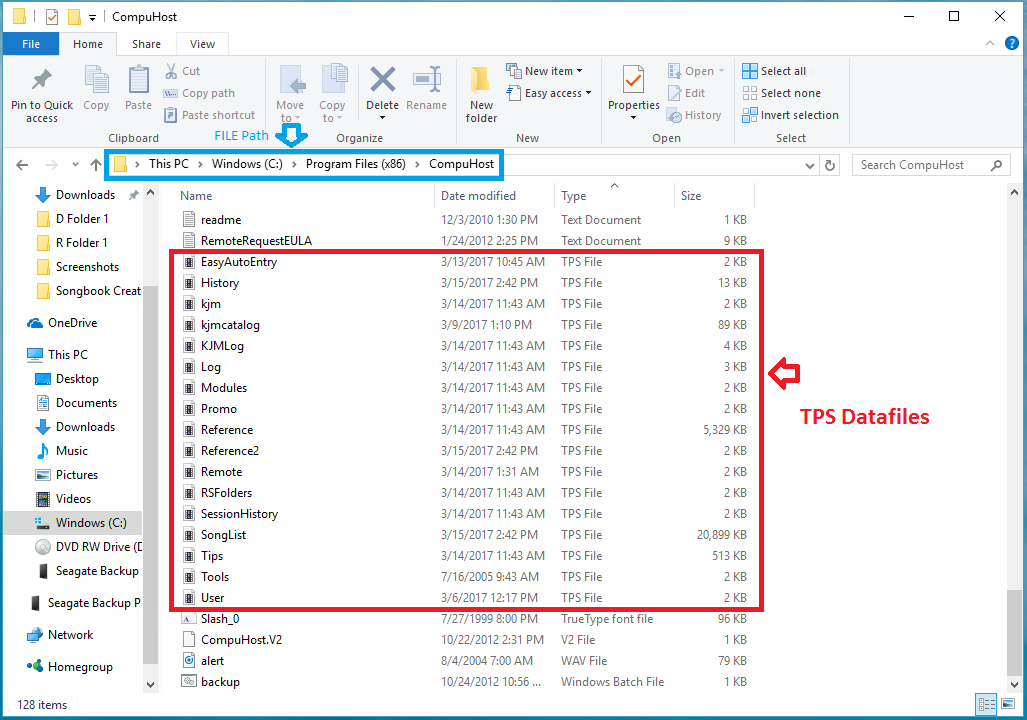
- Select and open the CompuHost Program Folder (Default: "C:\Program Files\CompuHost" or "C:\Program Files (x86)\CompuHost")
- Select and COPY all datafiles (*.tps) onto a movable/transferrable storage media (flashdrive etc.)
That's it! In the event of a catastrophic and/or unrecoverable computer failure, you'll simply reinstall CompuHost and once installed, copy your saved datafile backups back into the CompuHost program folder, overwriting the originals. You're back in business!
We hope this helps.