
Most often, distorted audio/sound quality is simply the result of certain "audio enhancements" being activated by default within the setup of some installed audio devices and/or their associated device drivers.
To hopefully resolve the issue, you may try DISABLING all such enhancements by...
- RIGHT-CLICK your mouse over the "Speaker" icon found toward the lower RIGHT of the Windows Task Bar (just to the left of the date/time).
- Select "Sounds" from the drop-down selections.
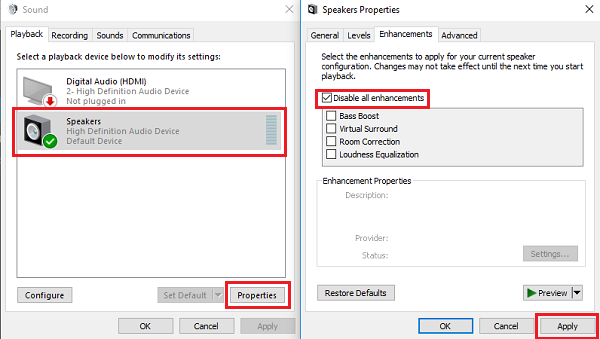
- Select the "Playback" tab at the top of the dialog.
- Select (highlight) the applicable audio device from the list of available devices.
- Select the button labeled "Properties" (lower RIGHT).
- Select the "Enhancements" tab.
- Activate/check the option labeled "Disable all enhancements".
- Select "Apply".
We hope this helps.