
To add individual Karaoke song files/selections to your searchable CompuHost catalog and immediately available for search/playback on-the-fly...
REMINDER! If wishing to catalog/index multiple Karaoke song files please refer to the built-in Help System (Top Main Menu->Help->CompuHost Help) under the topic "Getting Started->Indexing/Cataloging Existing Karaoke Content Files".Indexing/Cataloging Existing Karaoke Content Files
- Ensure the target Karaoke song file(s) are stored in a permanent drive/folder location.
IMPORTANT! You must also ensure the file(s) are NOT moved from the cataloged/indexed storage location or altered (renamed etc.) in any way once cataloged/indexed!
- Open the Song Search dialog by selecting either the "Add Song Request" button located below the Song Request Queue or the "Song Search & Drag" button locates within the lower Tool Bar.
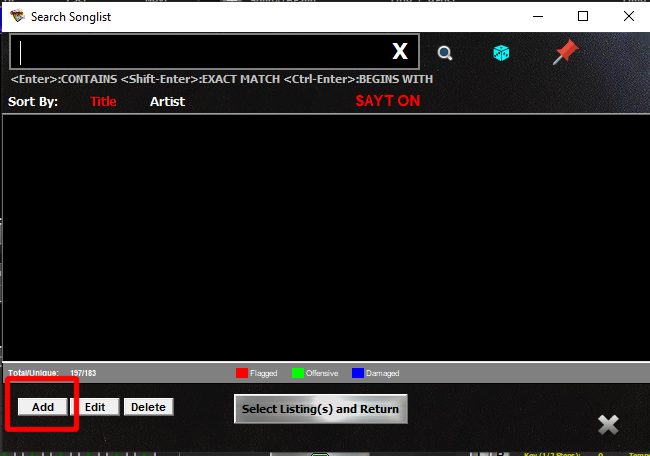
- Select the button labeled "Add" (highlighted in RED above).
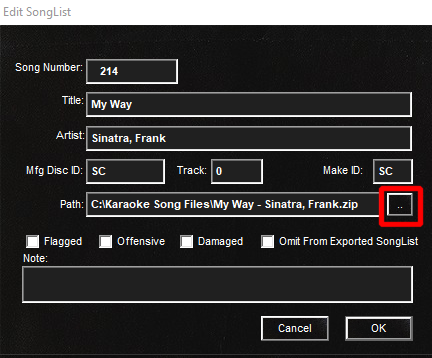
- Enter the Song Title, Artist and optionally the original Disc identifier, Track, and two-character Make/Brand ID as applicable.
- Select the button to the right of the "Path" field (highlighted in RED above) and locate the target Karaoke song file in its PERMANENT storage location.
- Finally, select "OK"
That's it! The new song selection is immediately searchable and selectable for playback!